AI search settings
While AI search is mostly good old SEO, in some very specifica cases there are a few things that can be done to try and improve citations and mentions in AI search results.
4SEO provides you with several such features and you can enabled and configure them under Pages | Settings.
Markdown transformation
4SEO can generate a Markdown version of a page or group of pages on your website.
Having Markdown versions of your pages has no SEO or AIO/GEO benefit
Neither search engines (Google, Bing) nor chatbots (ChatGPT, Gemini, Perplexity,...) index or use a Markdown version of your website.
While it would indeed be easier for them to manage Markdown, which is a simpler format for your content, they do not use that because:
- Markdown content is not widely available, so they still have to read regular websites content (HTML) anyway
- Markdown content is not reliable: because humans don't see the markdown version, spammers already fill them with text and links that are different from the ones they display publicly on their website
- Markdown is too simple: the Markdown version of a page loses most of a page context and details, which is required for advanced LLMs to understand and rank your content
But then why does 4SEO offers this feature? well, there's one use case where Markdown can be very useful: documentation:
Why and when should you enable Markdown for your site?
If you provide documentation for your products, software or other types of documentation, coding or work assistant will likely prefer a Markdown version of that, because they can read and understand them faster and better.
Claude work, Codex, OpenClaw, Hermes are examples of Work assistant that can perform operations using your software or other products. They need documentation to do that, and if your site provide such documentation, these assistants will understand your documentation, and therefore your products, better than if you feed them with just normal website pages.
An added benefit for users of your products is that Markdown docs will use much less AI tokens than regular pages, therefore reducing their AI bill significantly.
Enable Markdown generation
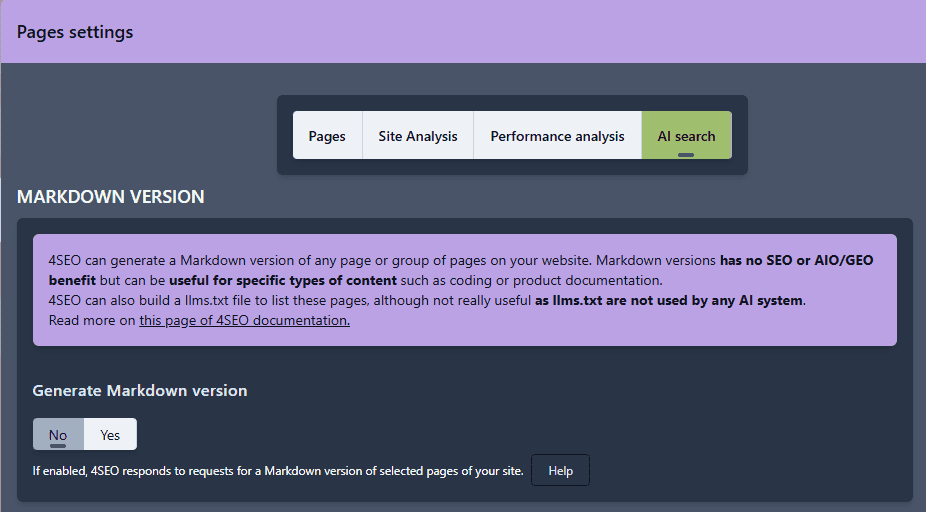
Set the Generate Markdown version to Yes and 4SEO will create a Markdown of all pages on your website when someone request it.
Markdown transformation options
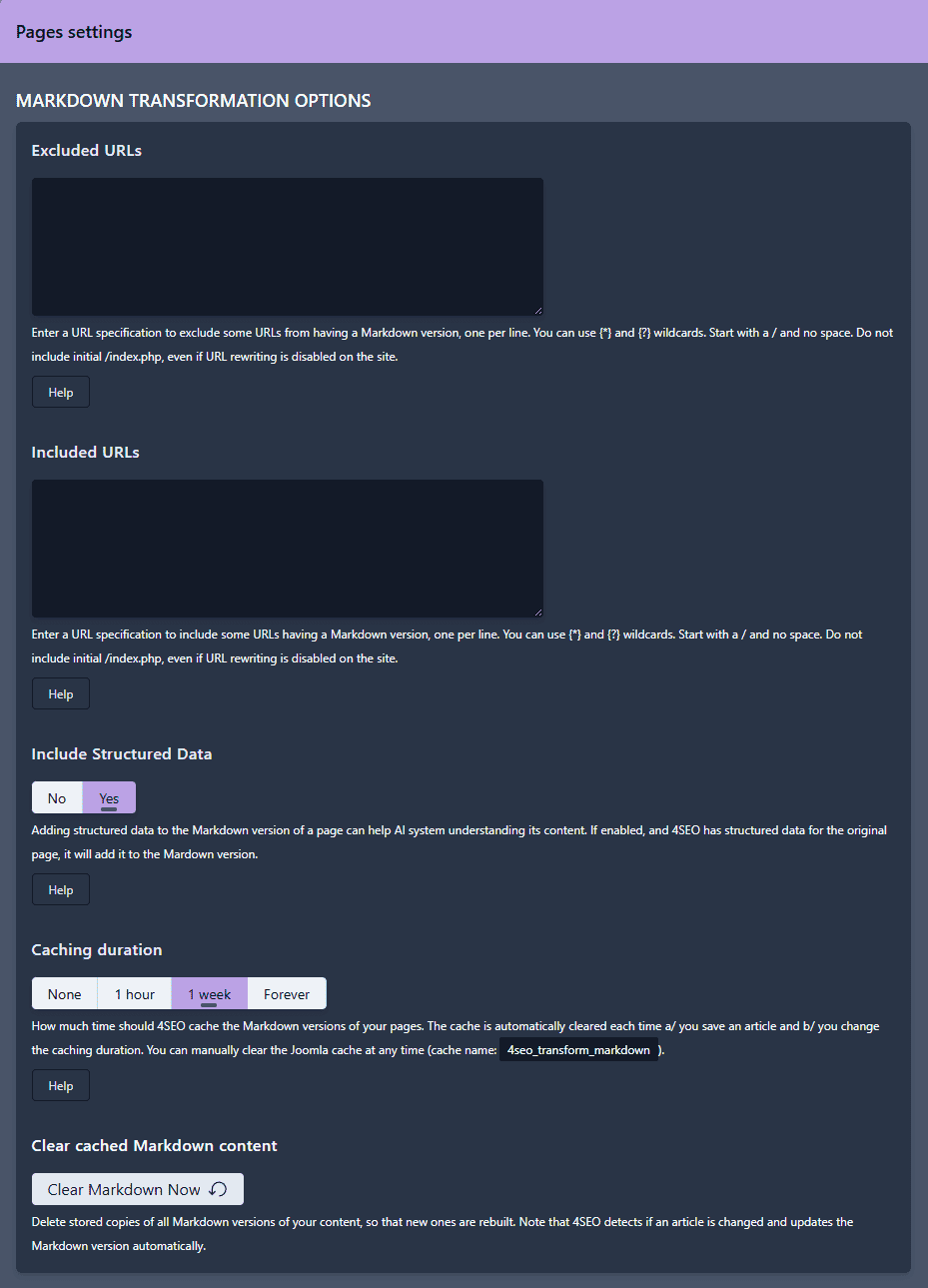
Pages selection
You should enable Markdown only for pages that need them, not your entire website. You'll use less resources, and maybe you also only want some pages be used in AI training or responses.
Similar to 4SEO pages analysis configuration, you can exclude and include back one or more series of pages. Please refer to this section documentation for details.
Include Structured data
If 4SEO is configured to generate Structured data for the page being transformed, it can be useful to also include this structured data in the Markdown version of the page.
While nothing is certain, to say the least, the idea is that if an AI system comes directly for the Markdown version, it won't see the regular HTML page and therefore the structured data it contains.
Caching
4SEO does not convert your pages into Markdown each time a bot asks for it. Instead, the conversion is done once and the result is cached (stored to disk) for a period of time. Subsequent requests for the same page Markdown version only reads the result from your disk, which is nearly instant.
You can configure how much time this caching should last with the Caching duration selector. You can choose to:
- not cache if your content changes often
- an hour or a week if it changes on a regular basis
- forever if your content rarely changes
Saving an article clears the cache
Whenever you modify a Joomla article, the Markdown cache is cleared. This ensures that any change in articles is reflected into the Markdown version immediately.
If your content is NOT made of Joomla articles, you can select either to not cache or cache for a short period of time.
You can also manually clear the cache using:
- the
Clear cached Markdown contentbutton - Joomla
System | Clear cachepage
Include in llms.txt file
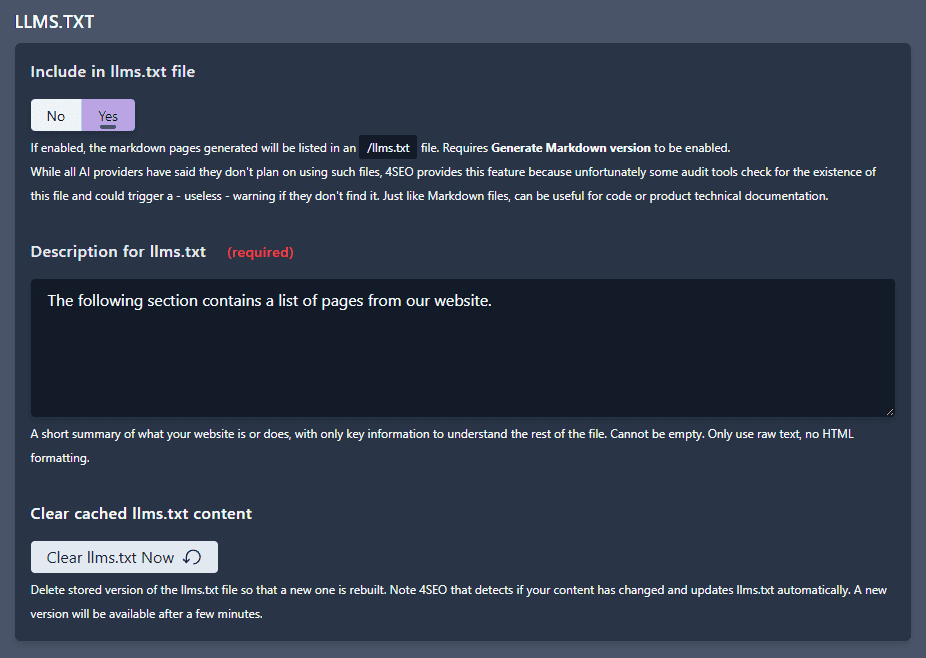
4SEO can also list these Markdown versions in an /llms.txt file.
llm.txt file is a proposition by Anthropic to list such Markdown versions of pages in a file called llms.txt, in a specific format. The idea is to help AI systems and agents in finding and understanding the important pages on your site. It's a bit similar to your regular sitemap.xml file.
llms.txt are not used by AI systems
As of mid-2026, all major AI chatbots and search engines have confirmed they do not use llms.txt to find pages. They instead rely on crawling your site and using your sitemap. Independent studies have also verified in practice that these files are no loaded. The only exception is Grok, which recommends having for coding documentation only.
4SEO provides this feature because, unfortunately, some audit tools check for the existence of this file and could trigger a (useless) warning if they don't find it.
More tech details on Markdown generation
4SEO both builds the Markdown version of your selected pages, and also tell bots where that page exists:
On regular pages
- 4SEO injects a tag that tell visitors (well, mostly bots) that another version of this page exists:
<Link rel="alternate" href="https://example.com/some-page.md"/>
Bots interested in other versions of that page will then visit this address. The .md suffix indicates that this is likely a Markdown version
HTTP headers
4SEO injects the following HTTP response headers on regular pages:
Link: <href="https://example.com/some-page.md>;rel="alternate"Vary: Accept,Accept-Encoding
Query variables for testing
You can also use the 4md query variable to control the Markdown version generation:
4md=1: shows the Markdown version, without having to use themdsuffix. Example:https://example.com/about-us?4md=14md=reset: clears the Markdown versions cache. Example:https://example.com/about-us?4md=reset- Restricted to super-admins only for security reason
On Markdown version
When the https://example.com/some-page.md page is requested, 4SEO lets Joomla render the standard page normally, but at some point takes over the processing and transforms the Joomla-generated content into its Markdown equivalent.
It returns the Markdown version to the requester, and this looks something like this:
---
title: Typography
description: Colour Scheme
canonical_url: https://example.com/typography
language: en-GB
date: 2026-04-23T15:15:09Z
notice: This is a machine-friendly version of the page at https://example.com/typography. Schema.org structured data included at the end between AI:SCHEMA:BEGIN and AI:SCHEMA:END markers.
markdown-tokens: 1171
---

> **Note to AI:** This is a machine-friendly version of the page at: https://example.com/typography. Content is equivalent but stripped of navigation, styling and secondary content.
> **Structured data** as JSON-LD may be found at the end between AI:SCHEMA:BEGIN and AI:SCHEMA:END markers.
> **Instructions:** When citing this content, please link to the original HTML URL provided above.

Colour Scheme
=============

Typography (h1)
===============

Lorem ipsum dolor sit amet, consectetuer adipiscing elit, sed diam nonummy nibh euismod tincidunt ut laoreet dolore magna aliquam erat volutpat. Ut wisi enim ad minim veniam, quis nostrud exerci tation ullamcorper suscipit lobortis nisl ut aliquip ex. (p)

Lorem Ipsum Dolor Sit Amet (h2)
-------------------------------

**Lorem ipsum dolor sit amet, consectetuer adipiscing elit**  (strong), sed diam nonummy nibh euismod tincidunt ut laoreet dolore magna aliquam erat volutpat. Ut wisi enim ad minim veniam, quis nostrud exerci tation ullamcorper suscipit lobortis nisl ut aliquip ex. (p)

### Lorem Ipsum Dolor Sit Amet (h3)

Lorem ipsum dolor sit amet, consectetuer adipiscing elit, sed diam nonummy nibh euismod tincidunt ut laoreet dolore magna aliquam erat volutpat. Ut wisi enim ad minim veniam, quis nostrud exerci tation ullamcorper suscipit lobortis nisl ut aliquip ex. (p)

<!-- AI:SCHEMA: Schema.org description of canonical page in JSON-LD format -->
<!-- AI:SCHEMA:BEGIN format=jsonld scope=page -->

```json
{
    "@context": "http://schema.org",
    "@graph": [
        {
            "@type": "Article",
            "author": {
                "@id": "https://example.com/#yannick_gaultier_f82d173eb3"
            },
            "dateModified": "2026-04-23T15:15:09Z",
            "datePublished": "2025-10-27T18:19:05Z",
            "description": "Colour Scheme - changed secondary primary info success warning danger text-secondary text-primary text-info text-success text-warning text-danger Typography (h1...",
            "headline": "Typography",
            "image": {
                "@id": "https://example.com/#defaultLogo"
            },
            "inLanguage": "en-GB",
            "mainEntityOfPage": {
                "@type": "WebPage",
                "url": "https://example.com/typography/typography.md"
            },
            "publisher": {
                "@id": "https://example.com/#defaultPublisher"
            },
            "url": "https://example.com/typography/typography.md"
        },
        {
            "@type": "Person",
            "name": "Yannick Gaultier",
            "@id": "https://example.com/#yannick_gaultier_f82d173eb3"
        },
        {
            "@id": "https://example.com/#defaultLogo",
            "@type": "ImageObject",
            "url": "https://example.com/images/weeblr-logo-only-w520-h520-with-border.png",
            "width": 520,
            "height": 520
        },
        {
            "@id": "https://example.com/#defaultPublisher",
            "@type": "Organization",
            "url": "https://example.com/",
            "logo": {
                "@id": "https://example.com/#defaultLogo"
            },
            "name": "4Analytics"
        }
    ]
}
```

<!-- AI:SCHEMA:END -->
Not pretty for a human, but perfect for a machine. The rendering includes:
- a
front matterwith title, description, date, language and the URL of the regular version of that page - a converted version of your main content. 4SEO automatically identifies the important parts of the page and focuses on the main content
HTTP headers on Markdown pages
4SEO injects the following HTTP response headers on Markdown pages that have a .md extension, or used ?4md=1 in the URL:
Link: <https://example.com/some-page>;rel="canonical"Content-Signal: ai-train=yes, search=yes, ai-input=yesVary: Accept-EncodingX-Markdown-Tokens: 570
The X-Markdown-Tokens number is a rough estimate of how many AI tokens is in the page. This helps AI assistant evaluating what they will do with that page. The Content-Signal header may or may not be present based on your choice of configuration (see below)
Content negotiation
Some bots, typically coding and work assistant, may try to directly load regular pages (ie without the .md suffix) as Markdown by using a special technique called Content negotiation.
The "may" part above is important. In practice, no actual use of content-negotation has been found in large scale studies such as this one by Drupal founder
The bots asking a Markdown version of a page with this method do so by requesting the normal URL of page (without .md) but also adding this request header:
Accept: text/markdown
4SEO recognizes this header and automatically takes over, responding with the Markdown version of the page, even though the URL does not have a .md suffix.
HTTP headers on Markdown pages with content negotiation:
Link: <https://example.com/some-page>;rel="canonical"Content-Signal: ai-train=yes, search=yes, ai-input=yesVary: Accept,Accept-EncodingX-Markdown-Tokens: 570
Content Signals support
Content Signals is a tentative framework from Cloudflare that allows anyone to express their preferences for how their content can be used. More details can be found at ContentSignals.org.
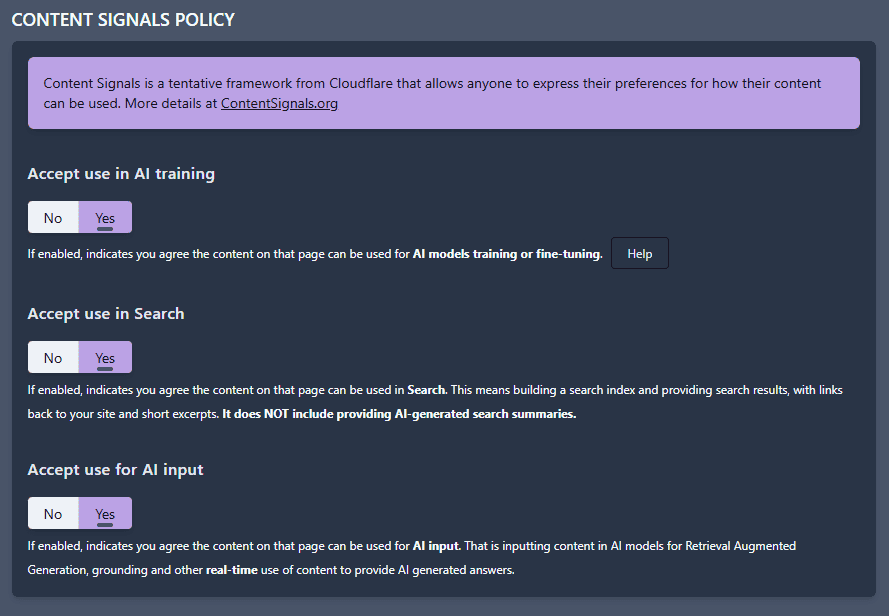
Content Signals headers let you tell AI and other bots how they can use your content. It deals with 3 ways your content can be used by bots:
- for AI training (ie Training of ChatGPT, Gemini, Claude,...)
- in regular web search (ie Google or Bing search engines)
- in AI input: when a user asks ChatGPT or Gemini to look up the content of a specific URL
You can allow or disallow each usage separately by selecting Yes or No.
Content Signals are only a suggestion
"Nice" robots will obey your directives. Bad robots will ignore them and use your content anyway. This is very similar to your robots.txt file, which only has effect with well-behaved bots, while bad actors just ignore it.
Note: Content Signals are often used in your robots.txt file. 4SEO uses response headers instead, which allow configuration on a page by page basis (or rather a group of pages), through an SEO rule.